
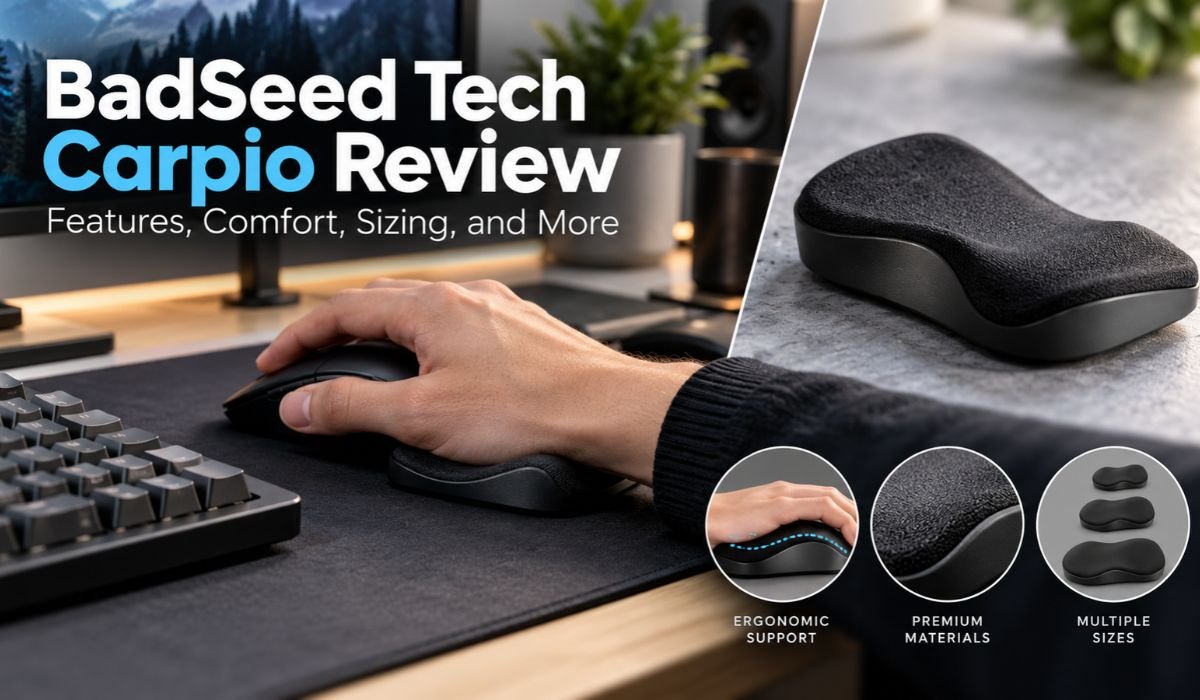
Building a comfortable computer setup usually starts with the obvious choices: a good mouse, a reliable keyboard, and a chair that doesn’t become uncomfortable after an hour. But smaller details matter, too. The way your palm sits on the desk, how your hand moves with the mouse, and whether your forearm has enough support can all shape the experience of spending hours at a computer.
That’s where the BadSeed Tech Carpio takes an unusual approach. Instead of behaving like a traditional foam or gel wrist rest that stays planted on the desk, it’s designed to glide along with your hand. The idea is simple: support the palm without forcing it to repeatedly move away from a stationary rest.
BadSeed Tech Carpio isn’t an entirely new product developed from scratch. It’s a special collaboration edition built on DeltaHub’s existing Carpio 2.0 platform. The core design and gliding concept remain familiar to the Carpio line, while the BadSeed Tech edition adds collaboration-specific styling and replaceable pads.
For anyone considering the product in 2026, appearance is only part of the story. Comfort, sizing, desk compatibility, mouse grip, peripheral height, and surface choice can matter much more in everyday use. This BadSeed Tech Carpio review looks at those details closely while separating confirmed product specifications from ergonomic claims and individual comfort preferences.
Quick Information About BadSeed Tech Carpio
| Information | Details |
|---|---|
| Product Name | BadSeed Tech Carpio |
| Manufacturer | DeltaHub |
| Collaboration | BadSeed Tech |
| Core Platform | Carpio 2.0 |
| Product Type | Gliding Palm And Wrist Support |
| Main Purpose | Palm Support During Mouse Movement |
| Base Material | ABS Plastic |
| Palm Pads | Silicone |
| Gliding Material | PTFE |
| Small Size | Approximately 8.4 × 3.6 cm |
| Large Size | Approximately 9.6 × 4.0 cm |
| Movement Style | Designed To Glide With The Hand |
| Electronics | None |
| Software Required | No |
| Charging Required | No |
| Replaceable Pads | Yes |
| Special Edition Detail | BadSeed Tech Pads And Styling |
| Common Use Cases | Gaming, Office Work, Editing And General Computer Use |
What Is BadSeed Tech Carpio?
The BadSeed Tech Carpio is a creator-collaboration edition of DeltaHub’s Carpio 2.0. It sits underneath the palm while you use a mouse and is designed to travel across the working surface as your hand moves.
That explanation is worth making early because the product name doesn’t immediately tell newcomers what they’re looking at. Carpio isn’t a mouse, controller, trackpad, or electronic computer accessory. There are no batteries inside it, no sensors to configure, and no Bluetooth or USB connection to worry about. It works entirely through its physical design.
The BadSeed Tech version uses the established Carpio 2.0 platform and adds collaboration-specific replaceable pads and styling. In other words, the special edition changes the presentation rather than introducing an entirely new ergonomic mechanism.
That’s useful to know before buying. If you’re mainly interested in how Carpio functions, the regular Carpio 2.0 is the obvious comparison. If you’re already a BadSeed Tech follower or simply prefer the collaboration’s appearance, the special edition may hold more appeal.
Design And Build Quality
Put the BadSeed Tech Carpio next to a conventional wrist rest and the difference is immediately obvious. Traditional keyboard and mouse rests often stretch across a sizable portion of the desk. Carpio is considerably smaller because it isn’t intended to stay in one position.
Its compact shape is central to the design. The accessory needs to remain underneath the palm while still being small enough to move naturally as the mouse travels across the desk.
The Carpio 2.0 platform combines three main materials. An ABS plastic structure provides the rigid foundation, silicone pads form the primary contact points for the palm, and PTFE gliding surfaces sit underneath.
Each material has a straightforward purpose. The ABS maintains the shape of the support, silicone provides a softer surface for the hand, and PTFE helps reduce friction during movement.
There’s another practical advantage to such a simple construction: there isn’t much to configure or maintain. No electronic components means no charging cable, firmware update, wireless connection, or companion software.
The BadSeed Tech edition gives this established platform a more distinctive appearance. Its collaboration pads and styling set it apart visually, although the underlying Carpio 2.0 mechanism remains the important functional element.
How BadSeed Tech Carpio Works
The easiest way to understand Carpio is to compare it with the wrist rest many people already know.
A conventional foam or gel support normally stays put. When you move the mouse farther across the desk, your hand either shifts across the rest or moves away from it altogether. Carpio tries to solve that differently.
The palm sits over two padded contact areas while the low-friction underside allows the whole support to move with the hand. Instead of returning to a fixed wrist rest after each movement, the support is intended to travel along with you.
DeltaHub says the design aims to redistribute pressure away from the sensitive carpal region toward stronger areas of the palm while encouraging movement involving more of the arm. It’s important to describe those statements accurately: they’re explanations from the manufacturer about the product’s ergonomic design, not guarantees that every user will experience a specific medical or comfort benefit.
The gliding mechanism itself, however, is fundamental to how the product operates. Users aren’t meant to hold Carpio firmly in one location. Allowing it to move naturally with the hand is part of the intended experience.
Medical Expert Input And Ergonomic Claims
Ergonomic products often come with ambitious language, so it’s worth separating a product’s development background from claims about medical effectiveness.
DeltaHub says medical professionals were involved in Carpio’s development. The company identifies Dr. Marko Mikša, whose professional work includes carpal tunnel surgery, as a contributor and says occupational medicine physicians were also consulted during the development process.
That’s relevant background information. It suggests that ergonomic considerations were part of the design process rather than something added only as a marketing label.
Still, the distinction between professional input and medical proof matters. A product developed with advice from healthcare professionals isn’t automatically a treatment for carpal tunnel syndrome, repetitive strain injury, or another medical condition.
For that reason, BadSeed Tech Carpio is best considered an ergonomic desk accessory built around palm support and movement. Its construction, size, materials, and gliding behavior can be evaluated directly. Medical outcomes shouldn’t be assumed.
BadSeed Tech Carpio Comfort
Comfort is likely to be one of the biggest questions for anyone researching the BadSeed Tech Carpio, yet it’s also the area where universal answers become difficult.
People don’t use mice in exactly the same way. Hand size, grip style, mouse shape, desk height, chair position, elbow support, sensitivity settings, and working habits all affect how an accessory feels.
There’s also the unusual sensation of having the support move. Someone who has spent years using a fixed foam wrist rest may initially find Carpio unfamiliar simply because it behaves differently. A short adjustment period wouldn’t be surprising.
Placement makes a difference as well. DeltaHub’s instructions call for the palm to rest on the silicone pads without excessive downward pressure. The Carpio and hand should then be allowed to glide together. Proper elbow support from the chair or desk is another part of the recommended setup.
Those details highlight an important point: Carpio doesn’t operate independently of everything around it. A poorly positioned mouse, unsupported elbow, unsuitable chair height, or awkward desk arrangement can still make a workstation uncomfortable.
Rather than asking whether Carpio is comfortable for everyone, it’s more useful to ask whether its moving-support design fits your hand and the way you’ve arranged your desk.
BadSeed Tech Carpio Sizing
Size deserves more attention than it might appear to at first. After all, this is a relatively small accessory, and even modest differences in dimensions can change how the palm sits on it.
The BadSeed Tech edition follows the Carpio 2.0 sizing system. The Small version measures approximately 8.4 × 3.6 cm, while the Large measures approximately 9.6 × 4.0 cm.
The larger model naturally provides a broader supporting area. The smaller version offers a more compact contact surface and may be better suited to smaller hands or people who prefer less material underneath the palm.
What buyers shouldn’t do is choose based only on their age, overall height, or the size someone else happens to use. Two people of similar height can have noticeably different hand dimensions.
Using the manufacturer’s current sizing guidance and comparing it with your own hand is the more sensible approach. That becomes particularly important when ordering online, where trying both versions before purchasing may not be practical.
How To Set Up BadSeed Tech Carpio Correctly
Carpio’s unusual design means setup isn’t quite the same as dropping a normal wrist rest next to your mouse.
Start with the palm positioned naturally over the padded contact areas. From there, the Carpio should be allowed to travel with regular mouse movement. Holding it deliberately in one location defeats much of the purpose of its gliding design.
The rest of the workstation matters, too. Your elbow shouldn’t be left hanging awkwardly while the palm is supported. Appropriate support from a desk or chair can help keep the overall arm position more natural.
Peripheral height is another factor that’s easy to overlook.
DeltaHub notes that particularly tall mechanical keyboards can create an alignment issue. According to its guidance, keyboards higher than roughly 1.5 cm at the front edge may leave the Carpio sitting lower than ideal relative to the keyboard.
Certain vertical and ergonomic mice can present a similar challenge because their hand position is naturally higher than that of a conventional mouse. DeltaHub offers Carpio Mods intended to add height where needed.
This helps explain why opinions about the same product can vary so widely. Carpio might line up neatly with one person’s mouse and desk while feeling noticeably too low in another setup.
Why The Desk Surface Matters
Because Carpio moves with the hand, the desk or mat underneath it becomes part of the experience.
PTFE is used on the underside to help reduce friction, but no gliding material performs identically on every surface. A smooth, clean working area will generally provide a more predictable experience than something rough, sticky, damaged, or covered in debris.
DeltaHub has identified materials such as felt and neoprene as suitable surfaces for Carpio use.
A simple practical comparison is to think about how easily your mouse already moves. If the surface regularly catches or creates noticeable resistance, a gliding palm support may encounter similar difficulties.
Cleanliness can make a difference as well. Hair, dust, and tiny particles may collect around the underside over time. Once that happens, movement can become less consistent.
For that reason, desk-surface compatibility isn’t merely a cosmetic concern. It’s directly connected to the way Carpio is designed to operate.
BadSeed Tech Carpio For Gaming
Gaming is a natural use case for the BadSeed Tech Carpio because many games involve frequent mouse movement. The compact design can also appeal to players who don’t want a large fixed wrist rest taking up space near the mouse.
That doesn’t mean Carpio should be marketed as an automatic performance upgrade.
There’s no sensible basis for promising that adding a palm support will suddenly improve aim, reaction speed, or competitive results. Its value for gaming is better understood through comfort, movement style, and compatibility.
A player using low mouse sensitivity and broad arm movements may experience the support differently from someone who relies on small, high-sensitivity adjustments. Mouse grip matters too. Palm, claw, fingertip, and hybrid grip styles change how much of the hand contacts both the mouse and the Carpio.
It’s also worth distinguishing this model from another DeltaHub product. The company offers a Carpio G2.0 aimed specifically at gaming. That version includes a removable strap designed to keep the support attached during more aggressive movements.
The BadSeed Tech edition covered here is based on the regular Carpio 2.0 platform, so shoppers shouldn’t assume it includes every feature found on the G2.0.
BadSeed Tech Carpio For Work And Productivity
Gaming gets plenty of attention, but Carpio’s design can be equally relevant to ordinary computer work.
Programmers, designers, video editors, students, and office workers may spend hours moving a mouse between documents, browser tabs, timelines, menus, spreadsheets, and applications. In those environments, a compact palm support offers a different experience from a long stationary cushion.
Portability is another potential advantage. Because Carpio is small and contains no electronics, it’s relatively easy to move between workstations or carry alongside other computer accessories.
Even so, it shouldn’t become the entire ergonomic strategy.
Monitor position, chair height, elbow support, desk height, mouse location, movement habits, and regular breaks all contribute to how a workstation feels over time. A palm support can’t compensate for every problem elsewhere in the setup.
That’s particularly important for people buying Carpio because they expect one accessory to transform an uncomfortable workstation. The better approach is to see it as one piece of a broader setup.
BadSeed Tech Carpio Vs Traditional Wrist Rests
The biggest difference between Carpio and a traditional wrist rest can be summed up in one word: movement.
A foam or gel rest normally provides a broad, stationary padded area. Carpio provides a much smaller support designed to travel with the hand. Those two ideas naturally produce different experiences.
A conventional rest may feel familiar immediately, especially for someone whose hand stays within a relatively small working area. Carpio, by comparison, is intended to remain useful as the mouse moves farther around the desk.
Its compact footprint is another distinction. There’s less material occupying the workstation, and moving the accessory between different setups is straightforward.
The trade-off is familiarity and stability. Some people simply like resting against a large stationary cushion and may not enjoy having the support underneath them move.
There’s no need to declare one approach universally superior. The better design depends on hand size, mouse movement, desk surface, working habits, and personal preference.
BadSeed Tech Carpio Vs Standard Carpio 2.0
This is arguably the most important comparison for anyone close to making a purchase.
The BadSeed Tech Carpio is built on the Carpio 2.0 platform. As a result, the core gliding concept isn’t exclusive to the collaboration edition.
The special edition is supplied as a black Carpio 2.0 with standard pads in the selected size and additional BadSeed Tech special-edition replaceable pads. The collaboration’s visual identity is therefore the most obvious reason to choose it instead of a standard model.
For BadSeed Tech followers, collectors, or anyone who simply prefers the collaboration’s appearance, that difference may be worthwhile.
Someone focused purely on functionality has a simpler decision. Compare the BadSeed Tech edition with the regular Carpio 2.0 based on current pricing, available sizes, hand configuration, colors, and stock.
If both options suit your setup equally well, paying extra purely for special-edition styling is a matter of personal preference rather than functional necessity.
Benefits And Limitations
Carpio’s biggest strength is that it isn’t simply another padded block.
The gliding mechanism provides a genuinely different approach to palm support, while the small size makes the product easy to move or carry. Its mechanical construction also keeps things refreshingly straightforward. There’s no charging schedule, battery, firmware, account, or companion software to manage.
Replaceable pads add another practical element to the Carpio 2.0 platform, and the BadSeed Tech version gives buyers a distinctive collaboration design.
Still, there are trade-offs.
Comfort isn’t universal. Choosing the right size matters, and the desk surface influences how easily the unit moves. Tall keyboards and certain mice may create height mismatches. Some people will need time to adjust to a moving support, while others may decide they simply prefer the stable feeling of a conventional wrist rest.
The difference between ergonomic intention and medical benefit also needs to remain clear. Carpio can be evaluated on its materials, construction, dimensions, movement, and compatibility. Those characteristics shouldn’t be turned into promises about health outcomes.
Understanding those limitations makes the product easier to evaluate realistically.
Cleaning And Long-Term Care
Carpio doesn’t require complicated maintenance, but a little routine care makes sense for something that constantly moves across a desk.
The underside deserves particular attention. Dust, hair, crumbs, and other small particles can collect around a moving accessory and potentially interfere with the smoothness of its glide.
The silicone pads also make regular contact with the hand, so skin oils and ordinary desk dust will naturally build up over time.
Gentle routine cleaning is the sensible approach. Before applying stronger cleaning products or chemicals, users should follow DeltaHub’s current care recommendations to avoid unnecessarily affecting the silicone, plastic, or gliding surfaces.
It’s also worth occasionally checking the replaceable pads and underside for obvious wear, particularly if Carpio is used for several hours every day.
Keeping the desk mat clean at the same time is equally useful. Since the accessory constantly travels across that surface, maintaining both parts of the setup helps preserve a more consistent feel.
Is BadSeed Tech Carpio Safe For Wrist Pain?
This subject deserves careful treatment because many people discover ergonomic products while searching for ways to deal with discomfort.
The BadSeed Tech Carpio isn’t a medical treatment.
DeltaHub presents the Carpio as an ergonomic support developed with medical-professional input and designed around changing how pressure is distributed near the palm and wrist. That background is relevant, but it shouldn’t be stretched into claims that the product can cure carpal tunnel syndrome, repetitive strain injury, or another medical condition.
Wrist and hand symptoms can have many causes. Pain, tingling, numbness, or weakness can’t be reliably diagnosed by changing a desk accessory.
Anyone experiencing persistent, worsening, or significant symptoms should seek advice from an appropriately qualified healthcare professional instead of relying on Carpio or another ergonomic product as treatment.
For general computer use, it’s more reasonable to view Carpio as one possible part of a thoughtfully arranged workstation.
Who Should Consider BadSeed Tech Carpio?
The most obvious candidate is someone who spends a lot of time using a mouse and finds the idea of moving palm support appealing.
That includes gamers, programmers, designers, editors, students, and office workers, although occupation alone doesn’t determine whether the product will feel comfortable.
People who dislike bulky stationary wrist rests may appreciate the compact design. Carpio may also suit users who regularly move between desks and want a small accessory that’s easy to carry.
Then there’s the special-edition factor. Fans of BadSeed Tech or people who simply prefer the collaboration styling have an additional reason to consider this version rather than the standard Carpio 2.0.
On the other hand, anyone using unusually tall peripherals should pay close attention to height compatibility. People who strongly prefer a large, stationary cushion may also find the moving design less appealing.
The most useful buying decision starts with your hand size, mouse, desk surface, grip, and movement style—not the logo printed on the product.
Is BadSeed Tech Carpio Worth It?
Whether the BadSeed Tech Carpio is worth buying ultimately depends on what you’re hoping to get from it.
If you want a compact palm support that travels with mouse movement, the Carpio 2.0 platform offers something meaningfully different from the traditional fixed wrist rest. Add an appreciation for the BadSeed Tech design, and the collaboration edition becomes easier to justify.
If the special styling doesn’t matter, the standard Carpio 2.0 deserves a close look before you spend anything. The underlying concept is substantially the same, so current pricing and availability could make the standard edition the more practical purchase.
Don’t overlook the smaller details either. Hand size, sizing choice, desk surface, mouse grip, peripheral height, and preferred support style are likely to have a greater effect on everyday satisfaction than the collaboration branding.
Rather than asking whether Carpio is the best wrist support on the market, ask a more useful question: does a support that moves with your hand make sense for the way you actually use your mouse?
Final Thoughts
The BadSeed Tech Carpio stands out for a surprisingly simple reason: it challenges the assumption that a wrist or palm rest has to stay still.
Built on DeltaHub’s Carpio 2.0 platform, it places the palm on silicone contact pads while PTFE surfaces underneath allow the support to travel with mouse movement. The design is compact, mechanical, and free from the software and charging requirements that come with so many modern desk accessories.
The BadSeed Tech collaboration gives that established concept a distinctive appearance through its special-edition replaceable pads and styling. What it doesn’t do is turn the product into a completely different version of Carpio. For buyers, that’s an important distinction because the standard Carpio 2.0 remains the closest functional alternative.
There’s also useful context behind the ergonomic design. DeltaHub says medical professionals contributed to Carpio’s development, including Dr. Marko Mikša and occupational medicine physicians. That adds credibility to the design process, but it shouldn’t be confused with evidence that the product can treat a medical condition.
In everyday use, much comes down to fit. The right size, suitable desk surface, sensible palm placement, supported elbow, compatible peripheral height, and a mouse grip that works naturally with the support are all important. Someone else’s positive experience can’t guarantee the same result on a completely different desk.
That’s ultimately the most sensible way to view the BadSeed Tech Carpio in 2026. It isn’t a miracle fix, nor is it merely a cosmetic desk accessory. It’s a distinctive take on palm support built around the idea that the support should move with the user rather than remain behind. For people who like that concept—and whose desk setup suits it—the BadSeed Tech edition offers the familiar Carpio 2.0 experience with a collaboration design of its own.
Frequently Asked Questions About BadSeed Tech Carpio
What Is BadSeed Tech Carpio?
BadSeed Tech Carpio is a special collaboration edition based on DeltaHub’s Carpio 2.0. It’s a compact ergonomic palm and wrist support designed to glide across the working surface as the hand moves while using a mouse.
Who Makes BadSeed Tech Carpio?
DeltaHub makes the underlying Carpio 2.0 platform. The BadSeed Tech version is a creator collaboration that adds special-edition replaceable pads and distinctive styling to that established product.
Does BadSeed Tech Carpio Need Software?
No. Carpio is entirely mechanical. It doesn’t require batteries, Bluetooth, USB, drivers, software, an account, or charging. Its function comes from its shape, palm pads, and low-friction gliding surfaces.
What Is BadSeed Tech Carpio Made From?
The Carpio 2.0 platform combines an ABS plastic structure with silicone palm-contact pads and PTFE gliding surfaces underneath. The materials serve different purposes, providing structure, softer palm contact, and low-friction movement.
What Sizes Are Available?
The BadSeed Tech edition follows the Carpio 2.0 sizing system. Small measures approximately 8.4 × 3.6 cm, while Large measures approximately 9.6 × 4.0 cm. Because hand proportions vary, buyers should use the manufacturer’s current sizing guidance instead of choosing based only on height or age.
Can BadSeed Tech Carpio Be Used For Gaming?
Yes. It can be used in a gaming setup, but how well it suits an individual player depends on hand size, mouse sensitivity, grip style, movement pattern, desk surface, and personal comfort. It shouldn’t be expected to automatically improve aim or competitive gaming performance.
Can Carpio Work With A Mechanical Keyboard Or Vertical Mouse?
Yes, although height compatibility deserves attention. DeltaHub notes that particularly tall mechanical keyboards and vertical or ergonomic mice may leave the Carpio sitting too low relative to the hand. Height-adjustment accessories are available for setups that require additional elevation.
Can BadSeed Tech Carpio Treat Carpal Tunnel Syndrome?
BadSeed Tech Carpio shouldn’t be treated as a cure or medical treatment for carpal tunnel syndrome, repetitive strain injury, or other medical conditions. Persistent pain, weakness, numbness, or tingling should be assessed by an appropriately qualified healthcare professional.
Learn more and explore exciting content on: Highly Personalized Message for Prospect Based on Responsibilities: Best Practices